Developer Kit · Examples
Custom Table con Mini Widgets
Custom Table con Mini Widgets
Más claridad en las tablas: Mini Widgets directamente en la Custom Table
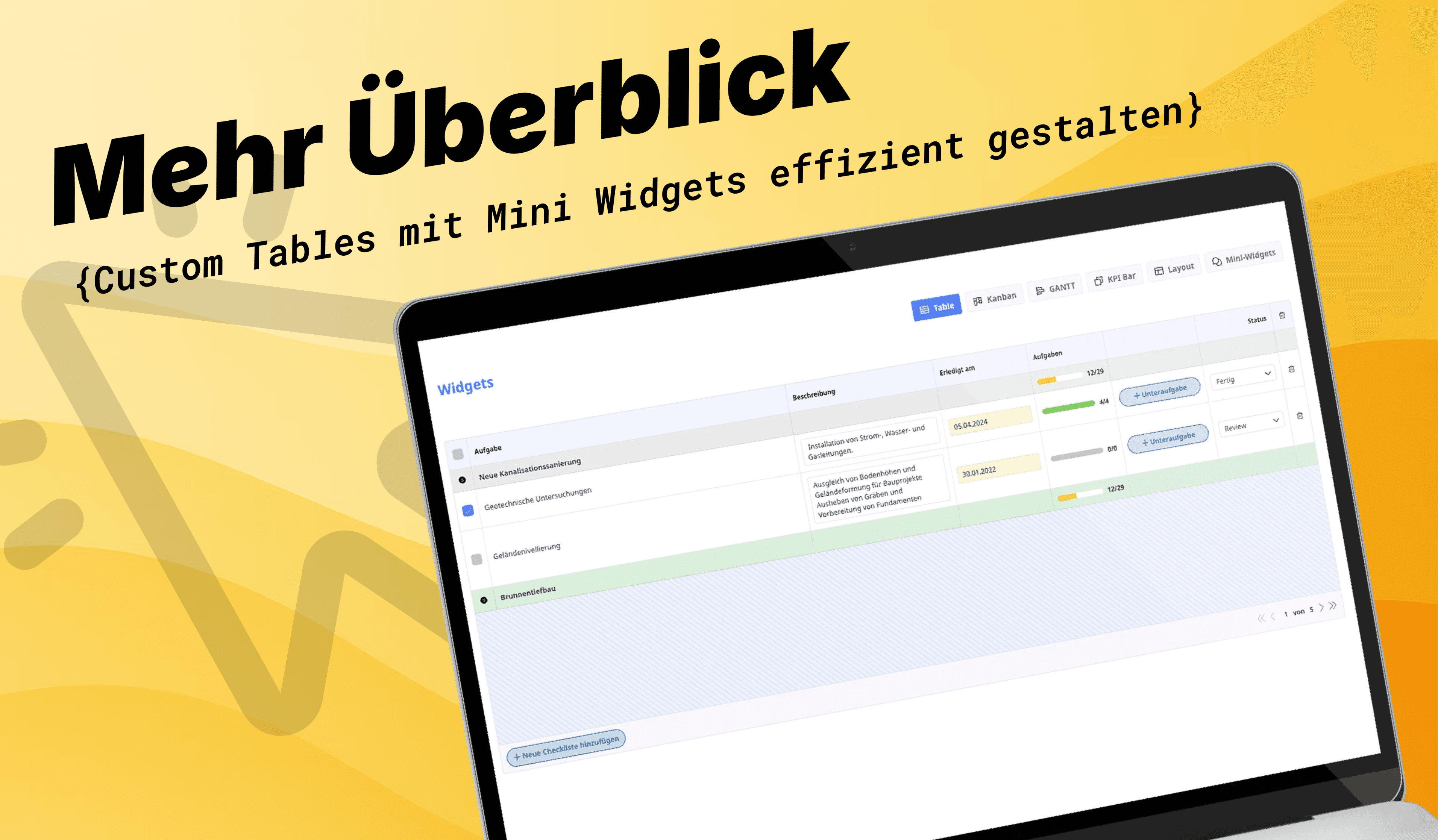
En este artículo os mostramos un ejemplo práctico y complejo de una Custom Table que hace vuestra gestión de tareas en Ninox mucho más clara e interactiva. La tabla agrupa las tareas por pedidos y combina funciones potentes con una presentación moderna.
Gracias a los Mini Widgets integrados —entre ellos <a href="/documentation/check-box">Checkbox</a>, <a href="/documentation/input">Input</a>, <a href="/documentation/progress-bar">Progress Bar</a>, <a href="/documentation/buttons">Button</a>, <a href="/documentation/select">Select</a>, <a href="/documentation/custom-icon">Icon</a> y <a href="/documentation/pagination">Pagination</a>— podéis manejar la tabla directamente, sin salir de la vista. Ideal para quienes quieren combinar eficiencia y usabilidad en sus flujos de trabajo.
Gestión de tareas simplificada
Con nuestra Custom Table gestionáis las tareas de forma tan simple y eficiente como nunca. Gracias a la agrupación por pedidos mantenéis siempre la visión de conjunto, y esto es solo el principio.
✅ Marcar tareas como hechas, fácilmente
Con el <a href="/documentation/check-box">Checkbox</a> integrado marcáis las tareas completadas directamente en la tabla. Un feedback visual os muestra al instante lo que ya está hecho.
📝 Editar descripciones directamente
En la columna «Descripción» encontráis <a href="/documentation/input">campos de entrada</a> multilínea. Con ellos podéis editar las tareas directamente, sin clics adicionales ni tener que abrir cada registro.
📅 Ajustar fechas rápidamente
Con el campo de fecha integrado actualizáis los vencimientos en un momento. Solo hay que elegir la nueva fecha y listo.
📊 El progreso, siempre a la vista
La <a href="/documentation/progress-bar">ProgressBar</a> integrada muestra de un vistazo hasta dónde habéis llegado con las tareas, con visualización en color y siempre actualizada.
➕ Añadir subtareas directamente
Con el <a href="/documentation/buttons">Button</a> creáis nuevas subtareas en un popup de Ninox. Así las tareas se pueden refinar y estructurar con flexibilidad.
🔄 Cambiar el estado fácilmente
Un menú <a href="/documentation/select">desplegable</a> permite cambiar directamente el estado de la tarea, de forma rápida, intuitiva y sin desvíos.
🗑️ Ordenar, fácil
Un clic en el <a href="/user/account/icons">icono de eliminar</a> quita las tareas sobrantes directamente de la tabla. Rápido, eficiente y sin pasos extra.
🎨 Vista en color
La función dinámica groupRowColor colorea automáticamente las filas según el progreso, para una claridad y visión de conjunto máximas.
⚙️ Seguid usando vuestras automatizaciones
Los widgets no interfieren en vuestra estructura de datos: podéis seguir usando todas las automatizaciones habituales en Ninox. Por ejemplo: establecer automáticamente la fecha en today() al completar una tarea, todo controlable mediante «Trigger tras cambio».
Conclusión
Con esta Custom Table llevas la gestión de tareas a un nuevo nivel. Mini Widgets interactivos como Checkbox, Input, Progress Bar, Button, Select, Icon y Pagination convierten vuestra tabla en un elemento de interfaz potente.
🚀 Eficiencia y claridad, directamente en Ninox.
Código de la aplicación del ejemplo
let current := this;
let list := (flteredList_Aufgaben[cnt(Auftrag.Aufgaben) > 5] order by cnt(Auftrag.Aufgaben)); //Ihr könnt euch Listen in extra Formel-Feldern vorfiltern, damit der Code nicht so lang wird
let maxEntries := 'Einträge pro Seite'; // Hilfsfeld Zahl
let currentPage := 'Aktuelle Seite'; // Hilfsfeld Zahl
let paginatedList := unique(record(Aufgaben,0))[!= 0];
for listItem in slice(list.Nr, maxEntries * (currentPage - 1), maxEntries * currentPage) do
paginatedList := unique(paginatedList, record(Aufgaben,listItem))
end;
let data := {
uniqueListId: "Aufgaben Demo 1",
tableId: tableId(first(list)),
height: "600px",
width: "100px",
groupedBy: "Aufgabe",
groupsCollapsed: false,
embedded: false,
table: paginatedList.[{
recordId: Nr,
rowColor: "",
rowHeight: "auto",
rowPaddingY: "10px",
groupRowColor: let currentRecord := Nr;
if cnt(list[Checkliste.Nr = currentRecord.Checkliste.Nr and Erledigt = true]) = cnt(list[Checkliste.Nr = currentRecord.Checkliste.Nr]) then
"#dcf2de"
else
"#eee"
end,
columns: [{
field: "Erledigt",
title: arcCheckBox({
value: if cnt(list[Erledigt = true]) != cnt(list) then
false
else
if cnt(list[Erledigt = null]) = cnt(list) then
null
else
if cnt(list[Erledigt = true]) = cnt(list) then
true
end
end
end
}),
value: arcCheckBox({
value: Erledigt
}),
width: "40px",
align: "center",
fixed: "left",
actions: [{
recordId: Nr,
type: "update",
field: "G",
value: if Erledigt = true then null else true end,
headerAction: true
}],
groupValue: arcCustomIcon({
name: "caret-circle-double-down-fill"
})
}, {
field: "Aufgabe",
title: "Aufgabe",
width: "",
value: replace(Aufgabe, ">", "❯"),
actions: [{
recordId: Nr,
type: "popup",
showPopupButton: true
}],
groupValue: html("**" + Auftrag.Titel + "**"),
groupByValue: Auftrag.Nr
}, {
field: "'Erledigt am'",
title: "Beschreibung",
value: arcCustomInput({
uniqueId: "Mein-Textarea-" + Nr,
recordId: Nr,
fieldId: "B",
title: Beschreibung,
value: Beschreibung,
type: "textarea",
embedded: true,
disabled: false,
width: "",
height: "auto",
minHeight: "40px",
fontColor: "",
fontSize: "",
fontWeight: "",
backgroundColor: "",
borderWidth: "",
borderColor: "",
borderRadius: "",
placeholderSettings: {
value: "Beschreibe die Aufgabe..."
},
focusAction: {
width: "",
showFocusOutline: "",
outlineWidth: "",
outlineColor: ""
},
alignX: "left",
paddingX: ""
}),
align: "left",
width: "280px"
}, {
field: "'Erledigt am'",
title: "Erledigt am",
value: arcCustomInput({
uniqueId: "Mein-Input-" + Nr,
recordId: Nr,
fieldId: "A1",
value: Startdatum,
type: "date",
embedded: true,
disabled: false,
width: "",
height: "",
fontColor: "",
fontSize: "",
fontWeight: "",
backgroundColor: "#fff6d8",
borderWidth: "",
borderColor: "",
borderRadius: "",
placeholderSettings: {
value: "Datum eintragen",
fontColor: "#e9595c",
backgroundColor: "#fff7f7"
},
focusAction: {
width: "",
showFocusOutline: "",
outlineWidth: "",
outlineColor: ""
},
alignX: "left",
paddingX: ""
}),
align: "left",
width: "180px"
}, {
field: "Aufgaben",
title: "Aufgaben",
value: arcCustomProgressBar({
uniqueId: "",
width: "",
fontSize: "",
fontColor: "",
backgroundColor: "",
progressColor: "",
valueTotal: cnt(Unteraufgaben),
valueProgress: cnt(Unteraufgaben[Erledigt = true]),
valueText: cnt(Unteraufgaben[Erledigt = true]) + "/" + cnt(Unteraufgaben)
}),
align: "left",
width: "150px",
groupValue: arcCustomProgressBar({
uniqueId: "Erledigte Aufgaben",
title: "",
width: "",
fontSize: "",
fontColor: "",
backgroundColor: "#fff",
progressColor: "",
valueTotal: cnt(Auftrag.Aufgaben),
valueProgress: cnt(Auftrag.Aufgaben[Erledigt = true]),
valueText: cnt(Auftrag.Aufgaben[Erledigt = true]) + "/" + cnt(Auftrag.Aufgaben)
})
}, {
field: "",
title: "",
value: arcCustomButton({
uniqueId: "Unteraufgabe erstellen" + Nr,
title: "Unteraufgabe",
width: "100%",
icon: arcCustomIcon({
name: "plus-bold",
color: "#0062AA"
}),
fontSize: "",
fontColor: "#0062AA",
iconColor: "#0062AA",
backgroundColor: "#0062AA33",
borderColor: "#0062AA",
borderRadius: "50px",
showBadge: false,
badgeTitle: cnt(Unteraufgaben),
badgeColor: "",
badgeBackground: "",
badgeBorderColor: "",
badgePosition: "",
hoverActions: {
fontColor: "#ffffff",
iconColor: "#ffffff",
backgroundColor: "#0062AA",
borderColor: "#0062AA",
animation: "0.5s"
},
actions: [{
type: "create",
tableId: "B",
popup: true,
changeFieldValues: [{
fieldId: "S",
value: number(Nr)
}]
}]
}),
align: "left",
width: "180px"
}, {
field: "Status",
title: "Status",
value: arcCustomSelect({
uniqueId: "Status" + Nr,
currentValue: text(Status),
recordId: Nr,
field: "Q",
width: "100%",
height: "30px",
fontSize: "10px",
placeholder: "Status wählen",
emptyValue: "Zurücksetzen",
items: let id := Nr;
(select Status_Aufgabe).[{
title: Bezeichnung,
active: number(id.Status) = number(Nr),
value: number(Nr)
}]
}),
align: "right",
width: "150px"
}, {
field: "delete",
title: arcCustomIcon({
name: "trash"
}),
width: "40px",
align: "center",
value: arcCustomIcon({
name: "trash"
}),
actions: [{
recordId: Nr,
type: "delete"
}]
}]
}],
footer: {
showFooter: true,
showActionButton: false,
actionButtonTitle: "Neue Aufgabe hinzufügen",
leftSideContent: arcCustomButton({
uniqueId: "Button popUp" + Nr,
title: "Neue Checkliste hinzufügen",
width: "",
icon: arcCustomIcon({
name: "plus-bold",
color: "#0062AA"
}),
fontSize: "",
fontColor: "#0062AA",
iconColor: "#0062AA",
backgroundColor: "#0062AA33",
borderColor: "#0062AA",
borderRadius: "50px",
showBadge: false,
badgeTitle: "",
badgeColor: "",
badgeBackground: "",
badgeBorderColor: "",
badgePosition: "",
hoverActions: {
fontColor: "#ffffff",
iconColor: "#ffffff",
backgroundColor: "#0062AA",
borderColor: "#0062AA",
animation: "0.8s"
},
actions: [{
type: "create",
tableId: "C",
popup: true,
changeFieldValues: [{
fieldId: "",
value: ""
}, {
fieldId: "",
value: ""
}]
}]
}),
rightSideContent: arcCustomPagination({
uniqueId: Nr,
editable: true,
recordId: current.Nr,
fieldId: "P",
direction: "horizontal",
title: current.'Aktuelle Seite',
value: current.'Aktuelle Seite',
total: ceil(cnt(list) / maxEntries),
totalPrefix: " von "
})
}
};
arcCustomTable(data)